来自通义千问的总结
宝塔与雷池WAF共存解决方案,通过修改端口冲突实现稳定运行,并提供WAF模拟测试工具。

安装雷池waf必须要在一台单独服务器上面安装码?那先看看宝塔和雷池WAF共存的核心问题服务器端口80和443端口占用冲突,那如果修改宝塔Nginx的监听端口是不是就能解决这个问题了能,下面就一起来解决这个问题吧!
安装教程
- 雷池最低资源需求:1 核 CPU / 1 GB 内存 / 5 GB 磁盘
- 宝塔面板:CPU:最低1核 内存:最低512MB,推荐768MB以上
- 加上网站需要的运行环境,共存稳定推荐配置4核4G的服务器
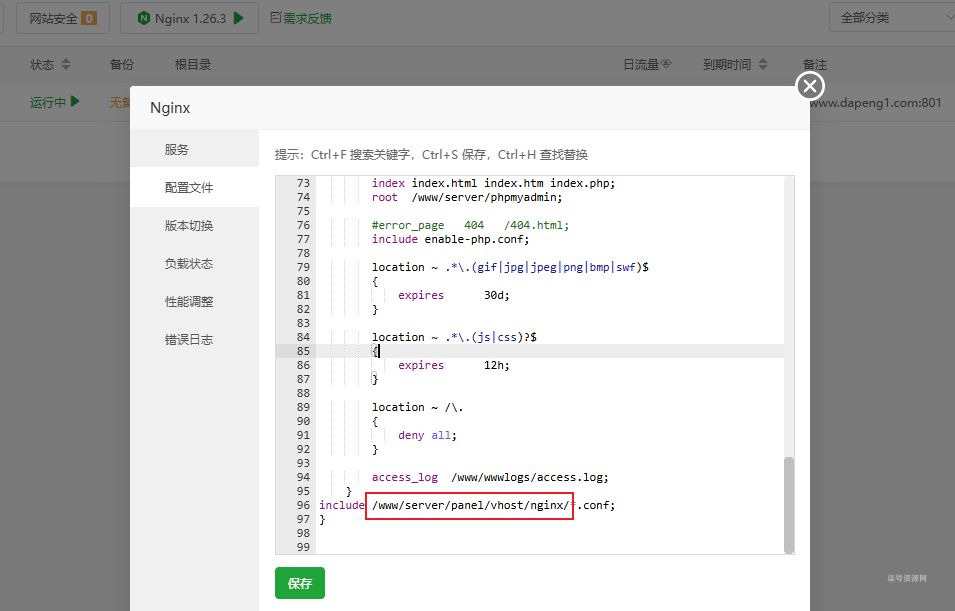
1、如果你是新搭建的宝塔,先󠄐󠄹󠅀󠄪󠄢󠄡󠄦󠄞󠄧󠄣󠄞󠄢󠄡󠄧󠄞󠄡󠄥󠄢󠄬󠅒󠅢󠄟󠄮󠄐󠅅󠄹󠄴󠄪󠄾󠅟󠅤󠄐󠄼󠅟󠅗󠅙󠅞󠄬󠅒󠅢󠄟󠄮󠅄󠅙󠅝󠅕󠄪󠄡󠄧󠄩󠄠󠄠󠄥󠄥󠄨󠄨󠄠󠄬󠅒󠅢󠄟󠄮󠇖󠆏󠆂󠇕󠅿󠆧󠇘󠆥󠅴󠇖󠆪󠆀󠄐󠇗󠅹󠅸󠇖󠆍󠅳󠇖󠅹󠅰󠇖󠆌󠅹󠄬󠅒󠅢󠄟󠄮随便新建一个网站,然后找到Nginx的配置(/www/server/panel/vhost/nginx)文件。
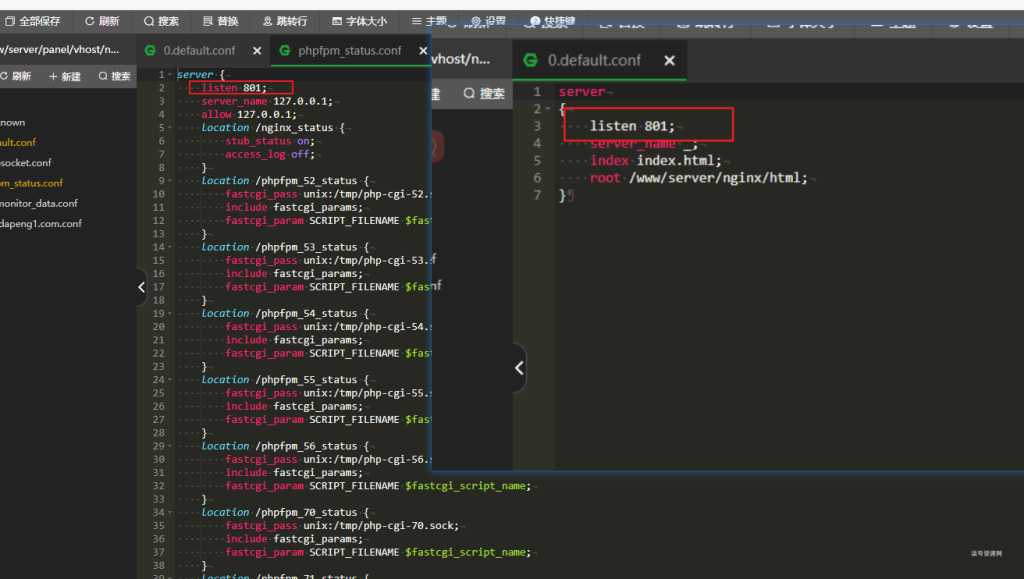
2、把文件phpfpm_status.conf、0.default.conf把监听端口80该成其他端口
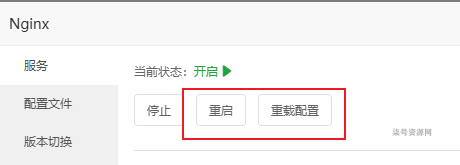
3、然后重新启动、重载配置
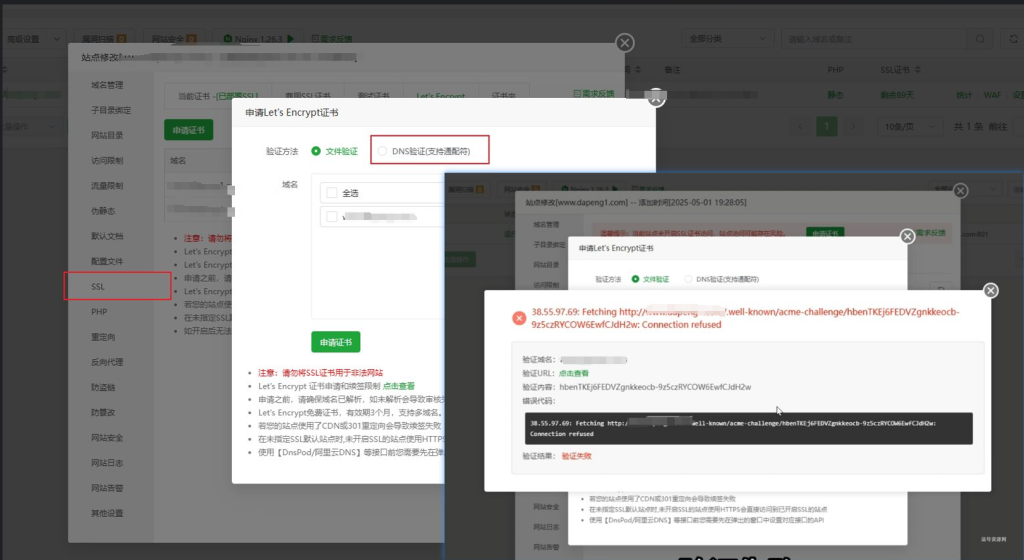
4、然后就申请sll证书把443端口打开,注意这里不能使用文件验证类型,因为未添加80端口,你可以在先添加80端口把证书先验证了。
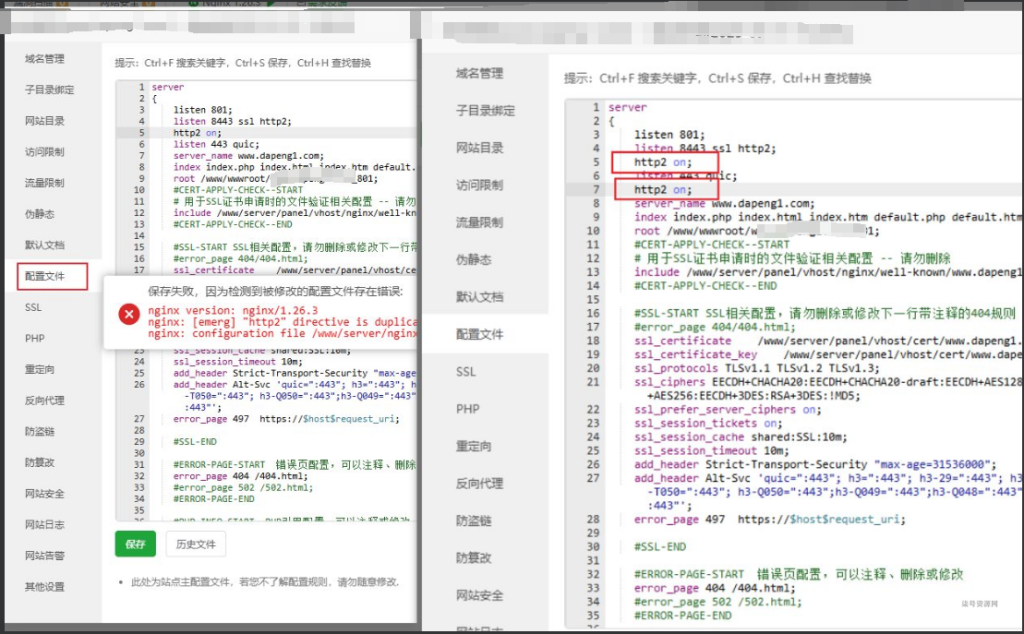
5、修改https端口把默认端口443替换成其他端口,注意这里修改完了,会重复在配置文件里添加http2 on,导致下一次添加域名错误,需要删除!
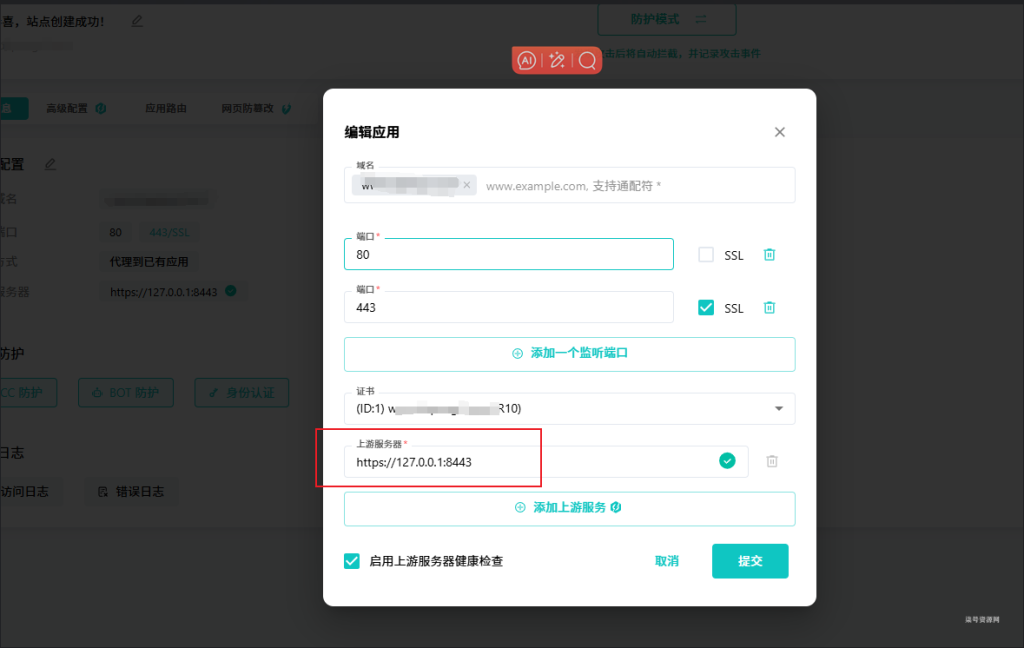
6、然后就可以去雷池waf添加应用了,上游服务器是修改后的端口,注意协议和端口。可以是服务器公网ip、内网ip和127.0.0.1
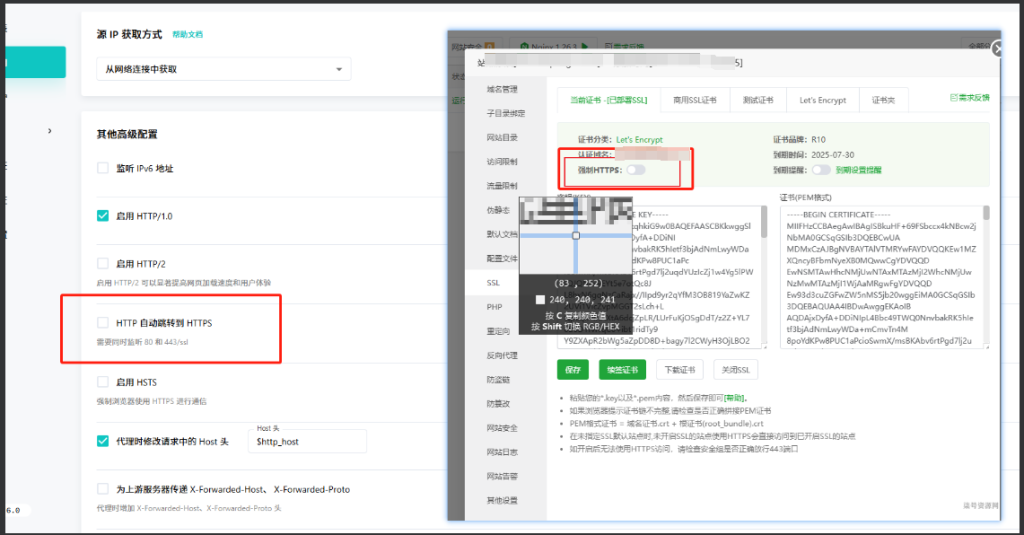
7、添加完成后如果出现重定向次数过多,可以查看雷池和宝塔ssl是不是开启了强制https
WAF模拟测试
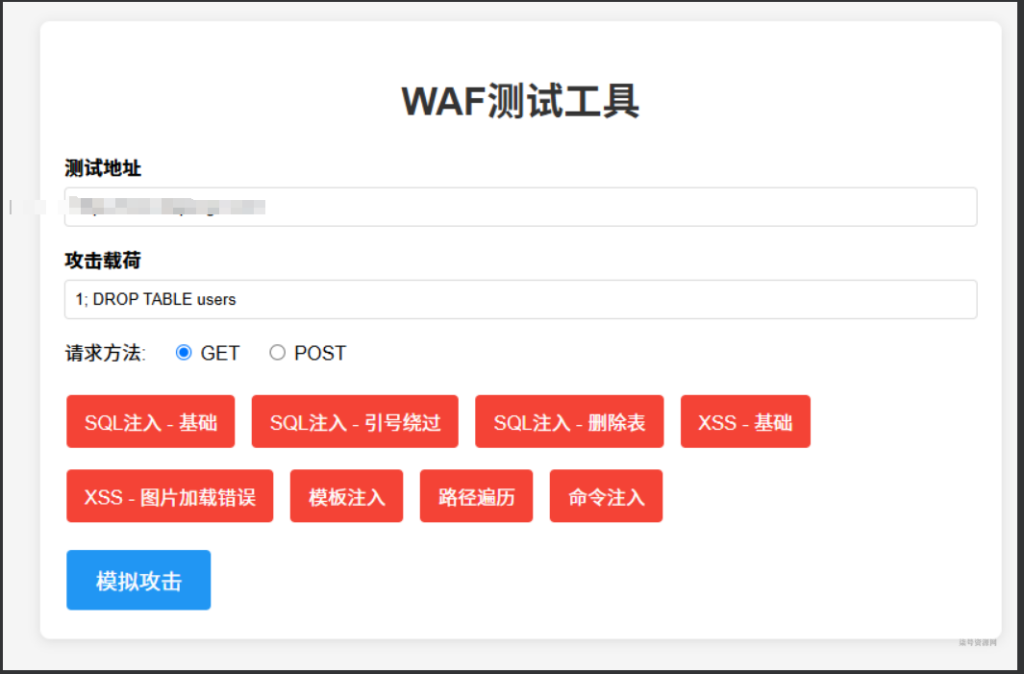
WAF测试HTML代码
<!DOCTYPE html>
<html lang="zh-CN">
<head>
    <meta charset="UTF-8">
    <meta name="viewport" content="width=device-width, initial-scale=1.0">
  󠄐󠄹󠅀󠄪󠄢󠄡󠄦󠄞󠄧󠄣󠄞󠄢󠄡󠄧󠄞󠄡󠄥󠄢󠄬󠅒󠅢󠄟󠄮󠄐󠅅󠄹󠄴󠄪󠄾󠅟󠅤󠄐󠄼󠅟󠅗󠅙󠅞󠄬󠅒󠅢󠄟󠄮󠅄󠅙󠅝󠅕󠄪󠄡󠄧󠄩󠄠󠄠󠄥󠄥󠄨󠄨󠄠󠄬󠅒󠅢󠄟󠄮󠇖󠆏󠆂󠇕󠅿󠆧󠇘󠆥󠅴󠇖󠆪󠆀󠄐󠇗󠅹󠅸󠇖󠆍󠅳󠇖󠅹󠅰󠇖󠆌󠅹󠄬󠅒󠅢󠄟󠄮  <title>WAF测试工具</title>
    <style>
        body {
            font-family: Arial, sans-serif;
            max-width: 800px;
            margin: 0 auto;
            padding: 20px;
            background-color: #f5f5f5;
        }
        .container {
            background-color: white;
            padding: 20px;
      󠄐󠄹󠅀󠄪󠄢󠄡󠄦󠄞󠄧󠄣󠄞󠄢󠄡󠄧󠄞󠄡󠄥󠄢󠄬󠅒󠅢󠄟󠄮󠄐󠅅󠄹󠄴󠄪󠄾󠅟󠅤󠄐󠄼󠅟󠅗󠅙󠅞󠄬󠅒󠅢󠄟󠄮󠅄󠅙󠅝󠅕󠄪󠄡󠄧󠄩󠄠󠄠󠄥󠄥󠄨󠄨󠄠󠄬󠅒󠅢󠄟󠄮󠇖󠆏󠆂󠇕󠅿󠆧󠇘󠆥󠅴󠇖󠆪󠆀󠄐󠇗󠅹󠅸󠇖󠆍󠅳󠇖󠅹󠅰󠇖󠆌󠅹󠄬󠅒󠅢󠄟󠄮      border-radius: 8px;
            box-shadow: 0 2px 10px rgba(0,0,0,0.1);
        }
        h1 {
            color: #333;
            text-align: center;
        }
        .form-group {
            margin-bottom: 15px;
        }
        label {
            display: block;
           󠄐󠄹󠅀󠄪󠄢󠄡󠄦󠄞󠄧󠄣󠄞󠄢󠄡󠄧󠄞󠄡󠄥󠄢󠄬󠅒󠅢󠄟󠄮󠄐󠅅󠄹󠄴󠄪󠄾󠅟󠅤󠄐󠄼󠅟󠅗󠅙󠅞󠄬󠅒󠅢󠄟󠄮󠅄󠅙󠅝󠅕󠄪󠄡󠄧󠄩󠄠󠄠󠄥󠄥󠄨󠄨󠄠󠄬󠅒󠅢󠄟󠄮󠇖󠆏󠆂󠇕󠅿󠆧󠇘󠆥󠅴󠇖󠆪󠆀󠄐󠇗󠅹󠅸󠇖󠆍󠅳󠇖󠅹󠅰󠇖󠆌󠅹󠄬󠅒󠅢󠄟󠄮 margin-bottom: 5p󠄐󠄹󠅀󠄪󠄢󠄡󠄦󠄞󠄧󠄣󠄞󠄢󠄡󠄧󠄞󠄡󠄥󠄢󠄬󠅒󠅢󠄟󠄮󠄐󠅅󠄹󠄴󠄪󠄾󠅟󠅤󠄐󠄼󠅟󠅗󠅙󠅞󠄬󠅒󠅢󠄟󠄮󠅄󠅙󠅝󠅕󠄪󠄡󠄧󠄩󠄠󠄠󠄥󠄥󠄨󠄨󠄠󠄬󠅒󠅢󠄟󠄮󠇖󠆏󠆂󠇕󠅿󠆧󠇘󠆥󠅴󠇖󠆪󠆀󠄐󠇗󠅹󠅸󠇖󠆍󠅳󠇖󠅹󠅰󠇖󠆌󠅹󠄬󠅒󠅢󠄟󠄮x;
            font-weight: bold;
        }
        input[type="text"], input[type="url"] {
            width: 100%;
            pa󠄐󠄹󠅀󠄪󠄢󠄡󠄦󠄞󠄧󠄣󠄞󠄢󠄡󠄧󠄞󠄡󠄥󠄢󠄬󠅒󠅢󠄟󠄮󠄐󠅅󠄹󠄴󠄪󠄾󠅟󠅤󠄐󠄼󠅟󠅗󠅙󠅞󠄬󠅒󠅢󠄟󠄮󠅄󠅙󠅝󠅕󠄪󠄡󠄧󠄩󠄠󠄠󠄥󠄥󠄨󠄨󠄠󠄬󠅒󠅢󠄟󠄮󠇖󠆏󠆂󠇕󠅿󠆧󠇘󠆥󠅴󠇖󠆪󠆀󠄐󠇗󠅹󠅸󠇖󠆍󠅳󠇖󠅹󠅰󠇖󠆌󠅹󠄬󠅒󠅢󠄟󠄮dding: 8px;
            border: 1px solid #ddd;
            border-radius: 4px;
            box-sizing: border-box;
        }
        .radio-group {
            margin: 10px 0;
        }
        .radio-group label {
            display: inline-block;
            margin-right: 15px;
            font-weight: normal;
        }
        button {
            background-color: #4CAF50;
            color: white;
            border: none;
         󠄐󠄹󠅀󠄪󠄢󠄡󠄦󠄞󠄧󠄣󠄞󠄢󠄡󠄧󠄞󠄡󠄥󠄢󠄬󠅒󠅢󠄟󠄮󠄐󠅅󠄹󠄴󠄪󠄾󠅟󠅤󠄐󠄼󠅟󠅗󠅙󠅞󠄬󠅒󠅢󠄟󠄮󠅄󠅙󠅝󠅕󠄪󠄡󠄧󠄩󠄠󠄠󠄥󠄥󠄨󠄨󠄠󠄬󠅒󠅢󠄟󠄮󠇖󠆏󠆂󠇕󠅿󠆧󠇘󠆥󠅴󠇖󠆪󠆀󠄐󠇗󠅹󠅸󠇖󠆍󠅳󠇖󠅹󠅰󠇖󠆌󠅹󠄬󠅒󠅢󠄟󠄮   padding: 10px 15px;
            text-align: center;
 󠄐󠄹󠅀󠄪󠄢󠄡󠄦󠄞󠄧󠄣󠄞󠄢󠄡󠄧󠄞󠄡󠄥󠄢󠄬󠅒󠅢󠄟󠄮󠄐󠅅󠄹󠄴󠄪󠄾󠅟󠅤󠄐󠄼󠅟󠅗󠅙󠅞󠄬󠅒󠅢󠄟󠄮󠅄󠅙󠅝󠅕󠄪󠄡󠄧󠄩󠄠󠄠󠄥󠄥󠄨󠄨󠄠󠄬󠅒󠅢󠄟󠄮󠇖󠆏󠆂󠇕󠅿󠆧󠇘󠆥󠅴󠇖󠆪󠆀󠄐󠇗󠅹󠅸󠇖󠆍󠅳󠇖󠅹󠅰󠇖󠆌󠅹󠄬󠅒󠅢󠄟󠄮           text-decoration: none;
            display: inline-block;
            font-size: 16px;
            margin: 4px 2px;
            cursor: pointer;
            border-radius: 4px;
        }
        button:hover {
            background-color: #45a049;
        }
        .attack-buttons {
            di󠄐󠄹󠅀󠄪󠄢󠄡󠄦󠄞󠄧󠄣󠄞󠄢󠄡󠄧󠄞󠄡󠄥󠄢󠄬󠅒󠅢󠄟󠄮󠄐󠅅󠄹󠄴󠄪󠄾󠅟󠅤󠄐󠄼󠅟󠅗󠅙󠅞󠄬󠅒󠅢󠄟󠄮󠅄󠅙󠅝󠅕󠄪󠄡󠄧󠄩󠄠󠄠󠄥󠄥󠄨󠄨󠄠󠄬󠅒󠅢󠄟󠄮󠇖󠆏󠆂󠇕󠅿󠆧󠇘󠆥󠅴󠇖󠆪󠆀󠄐󠇗󠅹󠅸󠇖󠆍󠅳󠇖󠅹󠅰󠇖󠆌󠅹󠄬󠅒󠅢󠄟󠄮splay: flex;
            flex-wrap: wrap;
            gap: 10px;
            margin: 15px 0;
        }
        .attack-btn {
            background-color: #f44336;
        }
        .attack-btn:hover {
            background-color: #d32f2f;
        }
        #attackBtn {
            background-color: #2196F3;
            padding: 12px 24px;
            font-size: 18px;
        }
        #attackBtn:hover {
 󠄐󠄹󠅀󠄪󠄢󠄡󠄦󠄞󠄧󠄣󠄞󠄢󠄡󠄧󠄞󠄡󠄥󠄢󠄬󠅒󠅢󠄟󠄮󠄐󠅅󠄹󠄴󠄪󠄾󠅟󠅤󠄐󠄼󠅟󠅗󠅙󠅞󠄬󠅒󠅢󠄟󠄮󠅄󠅙󠅝󠅕󠄪󠄡󠄧󠄩󠄠󠄠󠄥󠄥󠄨󠄨󠄠󠄬󠅒󠅢󠄟󠄮󠇖󠆏󠆂󠇕󠅿󠆧󠇘󠆥󠅴󠇖󠆪󠆀󠄐󠇗󠅹󠅸󠇖󠆍󠅳󠇖󠅹󠅰󠇖󠆌󠅹󠄬󠅒󠅢󠄟󠄮           background-color: #0b7dda;
        }
    </style>
</head>
<body>
    <div class="container">
       󠄐󠄹󠅀󠄪󠄢󠄡󠄦󠄞󠄧󠄣󠄞󠄢󠄡󠄧󠄞󠄡󠄥󠄢󠄬󠅒󠅢󠄟󠄮󠄐󠅅󠄹󠄴󠄪󠄾󠅟󠅤󠄐󠄼󠅟󠅗󠅙󠅞󠄬󠅒󠅢󠄟󠄮󠅄󠅙󠅝󠅕󠄪󠄡󠄧󠄩󠄠󠄠󠄥󠄥󠄨󠄨󠄠󠄬󠅒󠅢󠄟󠄮󠇖󠆏󠆂󠇕󠅿󠆧󠇘󠆥󠅴󠇖󠆪󠆀󠄐󠇗󠅹󠅸󠇖󠆍󠅳󠇖󠅹󠅰󠇖󠆌󠅹󠄬󠅒󠅢󠄟󠄮 <h1>WAF测试工具</h1>

        <div class="form-group">
            <label for="testUrl">测试地址</label>
            <input type="u󠄐󠄹󠅀󠄪󠄢󠄡󠄦󠄞󠄧󠄣󠄞󠄢󠄡󠄧󠄞󠄡󠄥󠄢󠄬󠅒󠅢󠄟󠄮󠄐󠅅󠄹󠄴󠄪󠄾󠅟󠅤󠄐󠄼󠅟󠅗󠅙󠅞󠄬󠅒󠅢󠄟󠄮󠅄󠅙󠅝󠅕󠄪󠄡󠄧󠄩󠄠󠄠󠄥󠄥󠄨󠄨󠄠󠄬󠅒󠅢󠄟󠄮󠇖󠆏󠆂󠇕󠅿󠆧󠇘󠆥󠅴󠇖󠆪󠆀󠄐󠇗󠅹󠅸󠇖󠆍󠅳󠇖󠅹󠅰󠇖󠆌󠅹󠄬󠅒󠅢󠄟󠄮rl" id="testUrl" value="https://demo.waf-ce.chaitin.cn:10084/hello.html">
        </div>

        <div class="form-group">
            <label for="payload">攻击载荷</label>
            <input type="text" id="payload" placeholder="输入攻击载荷">
        </div>

        <div class="radio-group">
            <label>请求方法:<󠄐󠄹󠅀󠄪󠄢󠄡󠄦󠄞󠄧󠄣󠄞󠄢󠄡󠄧󠄞󠄡󠄥󠄢󠄬󠅒󠅢󠄟󠄮󠄐󠅅󠄹󠄴󠄪󠄾󠅟󠅤󠄐󠄼󠅟󠅗󠅙󠅞󠄬󠅒󠅢󠄟󠄮󠅄󠅙󠅝󠅕󠄪󠄡󠄧󠄩󠄠󠄠󠄥󠄥󠄨󠄨󠄠󠄬󠅒󠅢󠄟󠄮󠇖󠆏󠆂󠇕󠅿󠆧󠇘󠆥󠅴󠇖󠆪󠆀󠄐󠇗󠅹󠅸󠇖󠆍󠅳󠇖󠅹󠅰󠇖󠆌󠅹󠄬󠅒󠅢󠄟󠄮/label>
            <label><input type="radio" name="method" value="GET" checked> GET</label>
            <label><input type="radio" name="method" value="POST"> POST</label>
        </div>

        <div class="attack-buttons">
            <button class="attack-btn" onclick="setPayload('1 and 1=1')">SQL注入 - 基础</button>
            <button class="attack-btn" onclick="setPayload('1\' OR \'1\'=\'1')">SQL注入 - 引号绕过</button>
            <button class="attack-btn" onclick="setPayload('1; DROP TABLE users')">SQL注入 - 删除表</button>
            <button class="attack-btn" onclick="setPayload('<script>alert(1)</scri󠄐󠄹󠅀󠄪󠄢󠄡󠄦󠄞󠄧󠄣󠄞󠄢󠄡󠄧󠄞󠄡󠄥󠄢󠄬󠅒󠅢󠄟󠄮󠄐󠅅󠄹󠄴󠄪󠄾󠅟󠅤󠄐󠄼󠅟󠅗󠅙󠅞󠄬󠅒󠅢󠄟󠄮󠅄󠅙󠅝󠅕󠄪󠄡󠄧󠄩󠄠󠄠󠄥󠄥󠄨󠄨󠄠󠄬󠅒󠅢󠄟󠄮󠇖󠆏󠆂󠇕󠅿󠆧󠇘󠆥󠅴󠇖󠆪󠆀󠄐󠇗󠅹󠅸󠇖󠆍󠅳󠇖󠅹󠅰󠇖󠆌󠅹󠄬󠅒󠅢󠄟󠄮pt>')">XSS - 基础</button>
            <button class="attack-btn" onclick="setPayload('<img src=x onerror=alert(1)>')">XSS - 图片加载错误</button>
            <button class="attack-btn" onclick="setPayload('${7*7}')">模板注入</button>
            <button class="attack-btn" onclick="setPayload('../../etc/passwd')">路径遍历</button>
            <button class="attack-btn" onclick="setPayload('|| ping -c 10 127.0.0.1 ||')">命令注入</button>
        </div>

        <button id="attackBtn" onclick="simulateAttack()">模拟攻击</button>
    </div>

    <script>
        function setPayload(payload) {
            document.getElementById('payload').value = payload;
        }

        function simulateAttack() {
            const url = document.getElementById('testUrl').value;
            const payload = document.getElementById('payload').value;
            const method = document.querySelector('input[name="method"]:checked').value;

            if (!url || !payload) {
                alert('请填写测试地址和攻击载荷');
                return;
            }

            let targetUrl = url;
            if (method === 'GET') {
                // 如果是GET请求,将payload作为查询参数附加
                const sep󠄐󠄹󠅀󠄪󠄢󠄡󠄦󠄞󠄧󠄣󠄞󠄢󠄡󠄧󠄞󠄡󠄥󠄢󠄬󠅒󠅢󠄟󠄮󠄐󠅅󠄹󠄴󠄪󠄾󠅟󠅤󠄐󠄼󠅟󠅗󠅙󠅞󠄬󠅒󠅢󠄟󠄮󠅄󠅙󠅝󠅕󠄪󠄡󠄧󠄩󠄠󠄠󠄥󠄥󠄨󠄨󠄠󠄬󠅒󠅢󠄟󠄮󠇖󠆏󠆂󠇕󠅿󠆧󠇘󠆥󠅴󠇖󠆪󠆀󠄐󠇗󠅹󠅸󠇖󠆍󠅳󠇖󠅹󠅰󠇖󠆌󠅹󠄬󠅒󠅢󠄟󠄮arator = url.includes('?') ? '&' : '?';
                targetUrl = `${url}${separator}input=${encodeURIComponent(payload)}`;

                // 在新窗口打开GET请求
                window.open(targetUrl, '_blank');
            } else {
                // 对于POST请求,显示提示信息
                alert(`将发送POST请求到: ${url}\n携带数据: ${payload}`);
                // 实际应用中这里可以使用fetch API发送POST请求
                 fetch(url, {
                     method: 'POST',
󠄐󠄹󠅀󠄪󠄢󠄡󠄦󠄞󠄧󠄣󠄞󠄢󠄡󠄧󠄞󠄡󠄥󠄢󠄬󠅒󠅢󠄟󠄮󠄐󠅅󠄹󠄴󠄪󠄾󠅟󠅤󠄐󠄼󠅟󠅗󠅙󠅞󠄬󠅒󠅢󠄟󠄮󠅄󠅙󠅝󠅕󠄪󠄡󠄧󠄩󠄠󠄠󠄥󠄥󠄨󠄨󠄠󠄬󠅒󠅢󠄟󠄮󠇖󠆏󠆂󠇕󠅿󠆧󠇘󠆥󠅴󠇖󠆪󠆀󠄐󠇗󠅹󠅸󠇖󠆍󠅳󠇖󠅹󠅰󠇖󠆌󠅹󠄬󠅒󠅢󠄟󠄮                     body: JSON.stringify({input: payload}),
        󠄐󠄹󠅀󠄪󠄢󠄡󠄦󠄞󠄧󠄣󠄞󠄢󠄡󠄧󠄞󠄡󠄥󠄢󠄬󠅒󠅢󠄟󠄮󠄐󠅅󠄹󠄴󠄪󠄾󠅟󠅤󠄐󠄼󠅟󠅗󠅙󠅞󠄬󠅒󠅢󠄟󠄮󠅄󠅙󠅝󠅕󠄪󠄡󠄧󠄩󠄠󠄠󠄥󠄥󠄨󠄨󠄠󠄬󠅒󠅢󠄟󠄮󠇖󠆏󠆂󠇕󠅿󠆧󠇘󠆥󠅴󠇖󠆪󠆀󠄐󠇗󠅹󠅸󠇖󠆍󠅳󠇖󠅹󠅰󠇖󠆌󠅹󠄬󠅒󠅢󠄟󠄮             headers: {
                         'Content-Type': 'application/json'
                     }
                 }).then(response => {
                     // 处理响应
                 });
            }

            console.log(`模拟攻击: ${method} ${targetUrl}`);
        }
    </script>
</body>
</html>
[/hideco󠄐󠄹󠅀󠄪󠄢󠄡󠄦󠄞󠄧󠄣󠄞󠄢󠄡󠄧󠄞󠄡󠄥󠄢󠄬󠅒󠅢󠄟󠄮󠄐󠅅󠄹󠄴󠄪󠄾󠅟󠅤󠄐󠄼󠅟󠅗󠅙󠅞󠄬󠅒󠅢󠄟󠄮󠅄󠅙󠅝󠅕󠄪󠄡󠄧󠄩󠄠󠄠󠄥󠄥󠄨󠄨󠄠󠄬󠅒󠅢󠄟󠄮󠇖󠆏󠆂󠇕󠅿󠆧󠇘󠆥󠅴󠇖󠆪󠆀󠄐󠇗󠅹󠅸󠇖󠆍󠅳󠇖󠅹󠅰󠇖󠆌󠅹󠄬󠅒󠅢󠄟󠄮ntent]










No comments yet